Evaluation of LAN Forge Tool
The need to build applications that reduces
customers risks, improves their cost effectiveness and time
to market is the principal goal of IS organizations. This calls
for developing robust applications with optimal performance.
A holistic approach to achieve optimal application performance
is through reliable testing and benchmarking against industry
standards, without compromising on other system qualities such
as flexibility, maintainability, reliability and usability.
A critical parameter of this holistic approach is to simulate
appropriate test environments to test application performance
at different intensity levels.
Ideally software development organizations without an independent
testing focus have a very minimal setup to test application
performance. The set up simulates an environment where in the
test application is hosted and accessed entirely from the customers
corporate LAN. However, this does not replicate the real time
scenario. Practically, applications extend beyond the corporate
LAN into WAN and probably through some lower bandwidth connection
options such as 56 Kbits, 128 Kbits, 256 Kbits, 512 Kbits, to
reach the end-user.
Software development organizations with an independent testing
practice are well geared through focused test lab facilities
for application performance testing.
Global Landmark has rich experience in carrying out
application performance testing through dedicated test lab facilities.
Global Landmark's test lab facility has a separate LAN with servers
that run virtual user simulation tools such as Rational Robot,
Open STA. Within this test lab framework the target application
is deployed in the appropriate environment and test scripts
are recorded using user simulation tools. Load test is then
run using the recorded scripts for 'n' number of users with
different bandwidth connection options. Global Landmark's technical
team has extensively evaluated the LAN Forge tool in different
performance testing scenarios, to validate its performance as
a bandwidth controlling tool. The different scenarios simulated
to test the LAN Forge tool is as follows:
| Scenario 1: Simulate,
a single WAN speed for all ‘n’ users running
the same script This is accomplished with a
simple set up as shown below:
|
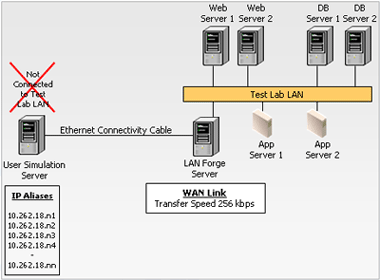 Figure 1: LAN Forge Deployment – Scenario
1
Figure 1: LAN Forge Deployment – Scenario
1
|
The LAN Forge deployment
for this scenario is as below:
|
-
All virtual users will connect
at the same transfer speed.
-
The framework will include one
user simulator server with a set of IP aliases and
tune to the WAN link, for operating at the required
transfer speed.
-
Further, the user simulator server
is connected to LAN Forge server through the crossover
cable. In turn, LAN Forge server is connected directly
to the LAN network.
-
The WAN link is set to specific
transfer rate (based on the requirement), say 256
Kbits in the LAN Forge GUI. Thus the LAN Forge is
connected to LAN at 256 Kbits.
-
Run the test scripts in Rational
Robot at 256 Kbits for ‘n’ number of users
and record the results to measure response time and
throughput.
|
|
| Scenario 2: Simulate
an environment involving different user groups running different
scripts at different speeds This is accomplished
with a setup as shown below:
|
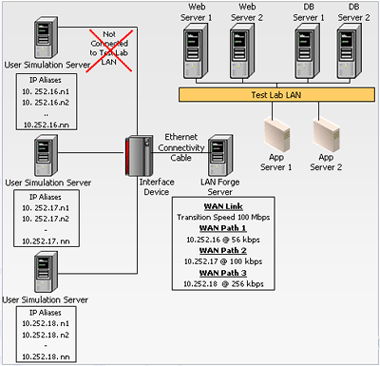
Figure 2: LAN Forge Deployment – Scenario 2
|
The LAN Forge deployment
for this scenario is as below :
|
-
Different virtual users will connect
at different transfer speeds.
-
Further the framework will require
multiple user simulator servers on different subnets.
-
Each of the user simulator servers
will have a set of IP aliases and connect through
different WAN paths to operate at different transfer
speeds.
-
Run the test scripts for different
user groups and record results to measure response
time and throughput.
|
 |
From the above evaluation
and our experience, LAN Forge is found to be a suitable bandwidth
controlling tool and can be used in test labs for the following
purposes:
|
- Measure application performance at different transfer
speeds.
-
Successfully test application
performance in slow transfer speeds such as 9.6 Kbits.
-
Configure different users to be
connected at different transfer speeds simultaneously.
-
Run the test scripts for different
user groups and record results to measure response
time and throughput.
|
| Based on the above findings,
we conclude that LAN Forge does not have any limitations.
Further, it substantially serves the purpose of simulating
different network bandwidth speeds and other network characteristics
to simulate real time scenarios. |
|